
AI Automation & Integration
AI Automation & Integration
Connect your tools. Automate the work. Keep humans in control.
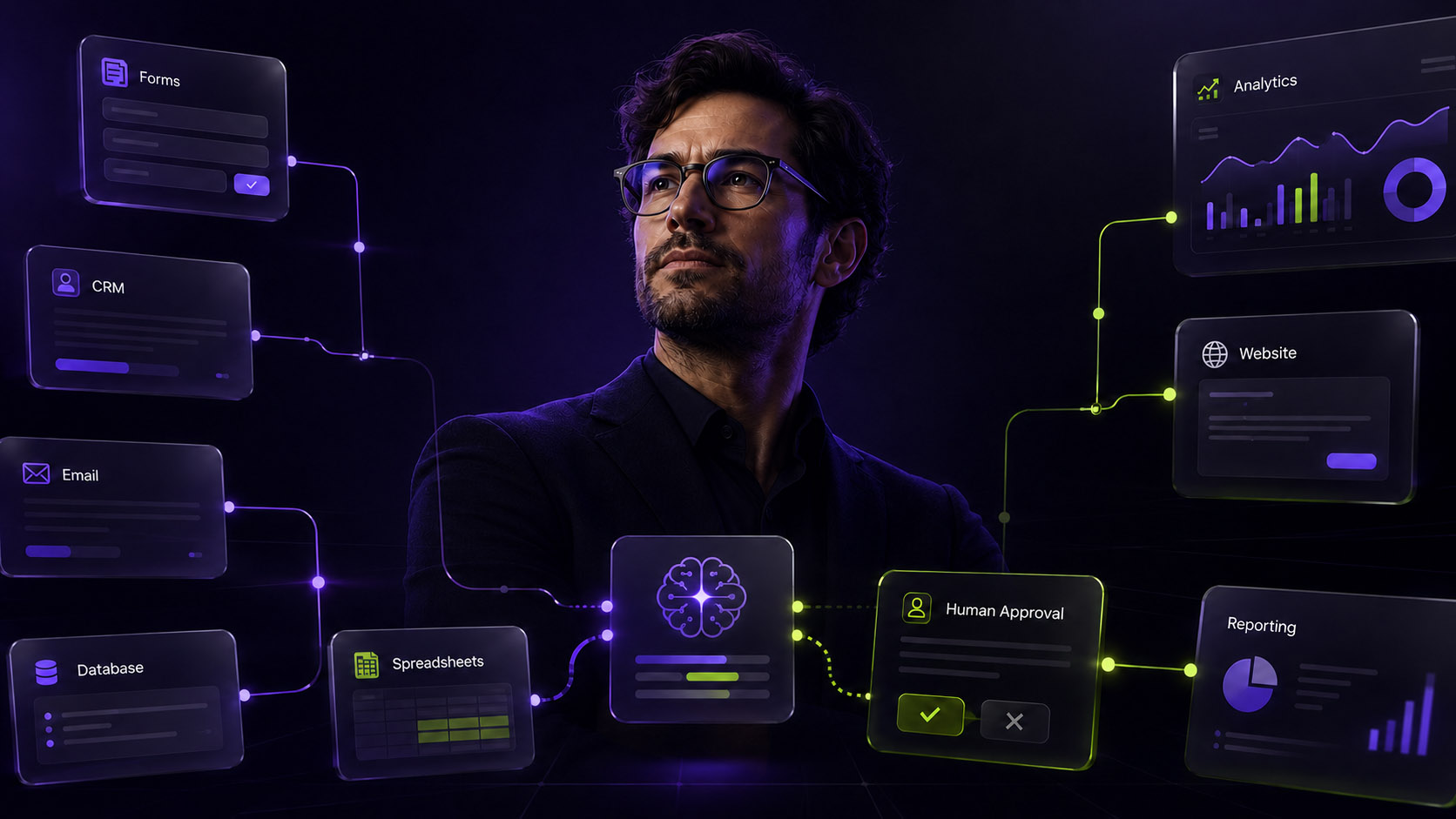
ALT SAINT designs and builds AI-powered workflows that connect your CRM, email, forms, databases, spreadsheets, websites and internal tools. We help reduce manual work, move data between systems, add AI where it creates value, and build safeguards so your team stays in control.
The Starting Point
Your tools should work together without constant manual effort.
AI Automation & Integration connects the systems your team already uses, then turns repetitive handoffs, updates, notifications and data movement into reliable workflows. The aim is not to automate everything. It is to remove the manual work that slows people down and creates avoidable errors.
Why It Matters
Disconnected systems create hidden operational drag.
Manual copy-paste, missed follow-ups, messy CRM records, repeated reporting and disconnected tools create friction that teams often stop noticing. Over time, this slows service delivery, creates errors and makes it harder to understand what is happening across the business.
We design automations around the way work actually happens. That means mapping the workflow, connecting the right systems, adding AI only where it helps, and keeping human approval in place for important decisions.
What We Automate
Workflows, systems and handoffs that slow your team down.
We focus on practical workflows where automation can reduce manual effort, improve data flow and make daily operations easier to manage.
Lead capture and qualification
Connect forms, ads, inboxes and CRM records so new enquiries are captured, scored, routed and followed up faster.
CRM and pipeline automation
Automate CRM updates, deal tasks, follow-up prompts, enrichment and internal alerts so sales activity is easier to manage.
Email and inbox workflows
Classify messages, summarise enquiries, draft responses, trigger tasks and route requests to the right person or system.
Document processing and data extraction
Extract useful information from PDFs, forms, emails or files, then send structured data into the right workflow.
Reporting and internal notifications
Turn scattered data into scheduled reports, dashboards, Slack alerts, email updates or operational summaries.
Approvals, monitoring and safeguards
Add human review, error alerts, logs and fallback paths so automations can be checked, trusted and improved over time.
What You Get
A working automation system, not just a workflow diagram.
You receive a mapped workflow, working automations, connected tools, AI steps where useful, testing, safeguards and documentation. Depending on scope, this can include CRM updates, email workflows, lead routing, document processing, reporting, approval flows, internal alerts or database integrations.
The goal is to build something your team can understand, operate and improve. We avoid black-box automation by documenting how the workflow works, what triggers it, where the data goes and where people need to stay involved.
How It Works
From workflow discovery to tested automation.
A practical process for turning a manual workflow into a connected automation your team can use.
01
Workflow Discovery
We identify the manual steps, systems, users, data sources and business goal behind the workflow.
02
Systems Mapping
We map the tools involved: CRM, email, forms, databases, websites, APIs, spreadsheets, Odoo, project tools or internal systems.
03
Automation Design
We define triggers, actions, AI steps, decision points, handoffs, approvals and fallback paths.
04
Build and Integration
We build the workflow using n8n, APIs, webhooks, databases, AI models and the systems your team already uses.
05
Testing and Safeguards
We test real scenarios, check data outputs, add approvals where needed, and set up alerts or error handling.
06
Handover and Optimisation
We document the workflow, explain how it works, and identify improvements once it is running in the business.
BUILT IN PRODUCTION
Automations designed to run inside real businesses
From lead routing and CRM updates to approvals, reporting and AI-assisted processing, we build workflows around the systems your team already uses, with logic, safeguards and handover built in from the start.
Why This Works Better
More reliable than ad hoc automations. More practical than a strategy deck.
| Area | ALT SAINT approach | Common alternative | Why it matters |
|---|---|---|---|
| Starting point | We map the workflow, systems, users and business goal before building. | Automating one task without understanding the full process. | Good automation starts with the workflow, not the tool. |
| Integration logic | We connect CRMs, forms, email, databases, APIs, spreadsheets and internal systems around the way work actually happens. | Using disconnected tools or one-off automations without a wider structure. | Connected workflows reduce manual handoffs and duplicate work. |
| AI role | We use AI where it can classify, summarise, enrich, generate or route information usefully. | Adding AI to every step because it sounds impressive. | AI should improve the workflow, not make it less predictable. |
| Reliability and monitoring | We add testing, fallback paths, error alerts, logs and human approvals where needed. | Launching automations without visibility when something breaks. | Operational workflows need to be trusted after launch. |
| Handover and ownership | We document the workflow and explain how it works so the team can operate it. | A black-box build no one understands. | Your team needs confidence, not dependency. |
| Business value | We prioritise workflows that save time, reduce errors or improve service delivery. | Automating low-value tasks because they are easy. | Automation should create measurable operational value. |
Explore Alt Saint with AI
Ask Alt Saint AI
Related Services
AI Automation & Integration Related Services
Explore related services to discover more solutions, capabilities and ways we can help.


Start With the Workflow
Ready to automate the work slowing your team down?
We’ll map the workflow, connect the right systems, add AI where it creates value and build the safeguards your team needs to trust the automation.
Start the Automation Conversation
Tell us what you want to connect, improve or automate.
Share the tools you use, the workflow that slows your team down, the manual steps involved and where data needs to move. We’ll use this context to understand whether you need workflow automation, CRM integration, AI-assisted processing, reporting automation or a deeper systems build.
Questions
What clients usually ask before building automations.
What is AI Automation & Integration?
AI Automation & Integration connects AI to your business systems so repetitive tasks, data movement, communication flows and operational processes can run with less manual work.
How is this different from normal automation?
Traditional automation follows fixed rules. AI automation can classify, summarise, extract, enrich or draft information inside the workflow, while still using safeguards where needed.
What tools can you integrate with?
We can connect CRMs, email platforms, databases, websites, forms, spreadsheets, Google Workspace, Microsoft 365, Slack, ClickUp, Odoo, n8n, Zapier, Make, APIs and custom systems.
Do we need to replace our current systems?
Usually no. The goal is often to connect and improve the tools you already use rather than force a new platform.
Can you build automations with n8n?
Yes. n8n is one of the platforms we use for flexible workflow automation, API connections, custom logic and AI-enabled processes.
Can you connect AI to our CRM?
Yes. We can support lead qualification, enrichment, follow-up suggestions, automatic notes, pipeline updates, task creation and reporting.
How do you keep automations reliable?
We test workflows, define fallback paths, add error alerts, use human approval steps where needed, and set up logs or review points for important processes.
Can you hand over and document the workflows?
Yes. We can document how the workflow works, what systems it connects, what triggers it, where data goes, and what your team should monitor.